JevMade

Sign in
← Back to experiments

Apps & data pipelines

Jev-Interaction

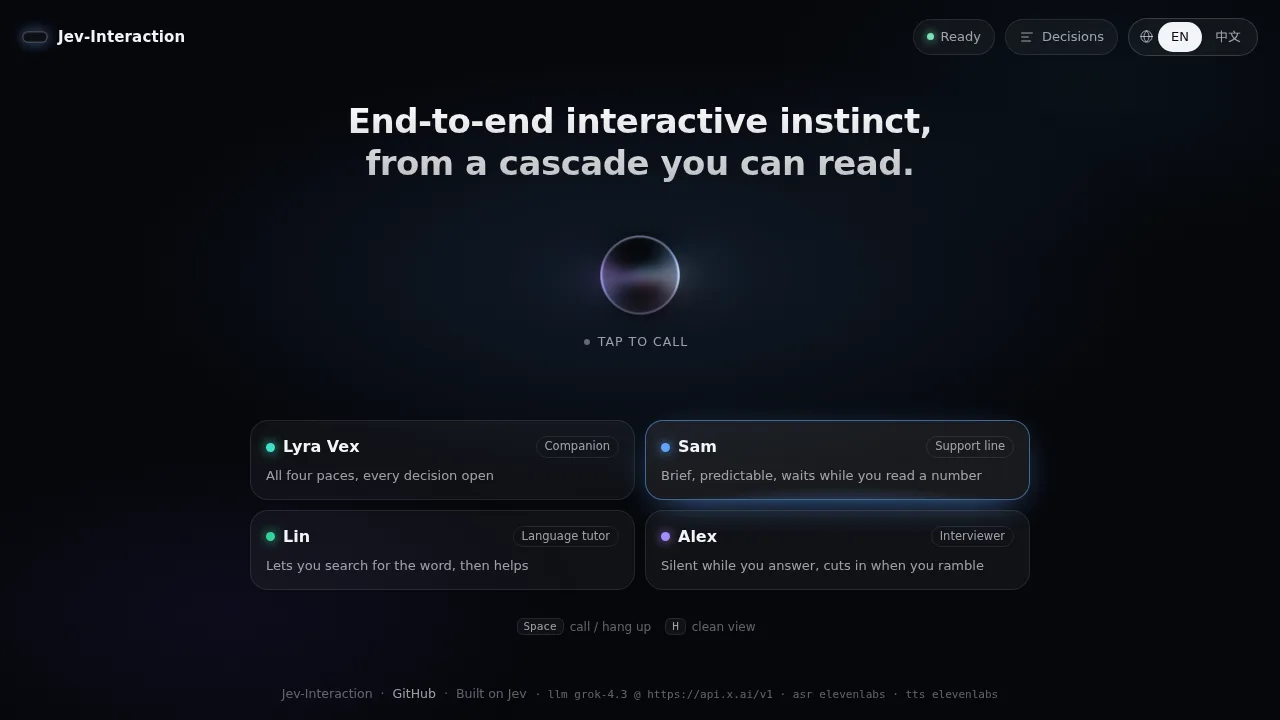
Call a voice agent in the browser and watch Jev decide, moment by moment, when to wait, yield, backchannel or hang up.

Source screenshot of Jev-Interaction
SOURCE SCREENSHOTFull screenshot ↗

What it does

Every decision is logged with the state Jev read and its probabilities, and recorded calls can be replayed against reworded questions. The maker reports zero-shot benchmark results and notes it trails trained audio models on pure timing from sound.

How you can use it

Clone the repository and run the setup script, or install the package and run jev-interaction serve, then open http://localhost:8080.

The setup page walks through pasting keys for Jev, a language model, speech recognition and a voice, testing each step.

Pick a persona and click the orb to start a call; a decision log shows each Jev judgment with its probabilities.
Maker-reported (not independently measured by JevMade)

The maker reports a decision answered by Jev in tens of milliseconds. · The maker reports 0.06 real pauses taken as turns on Full-Duplex-Bench v1.0, against Gemini Live 0.10 and GPT-Realtime 0.12. · The maker reports 4.61 of 5 for answer relevance after an interruption, against 4.12 for the best reference. · The maker reports about $0.002 of language model cost per reply and about $2 for a 400-sample benchmark round.

Primitives
choice
Platform
Python
Added
Project created
GitHub stars
60 (snapshot, not live)

Keep this for later

Sign in to bookmark experiments, guides and videos, and keep notes only you can see.

Continue to sign in

We’ll bring you back to this listing.